Bing Enhances AI Overview Cards With Images
Bing AI Overview cards now display images, aiming to boost user engagement. This update may increase clicks on the cards.
Original reporting · searchenginewatch.com
Original: “Bing AI Overview cards now show images”
Read “Bing AI Overview cards now show images” at Search Engine Watch →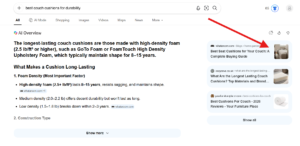
How this was written. Clicktag wrote this article with a language model from Search Engine Watch’s reporting (model: @cf/meta/llama-3.3-70b-instruct-fp8-fast); it describes that reporting rather than adding to it. The original, linked above, is the full story.
Key points from Search Engine Watch’s report
- Bing has updated its AI Overview cards to include images, in addition to website titles and descriptions.
- The addition of images is expected to enhance the user experience and may increase clicks on the cards.
- Bing is focused on improving its search results, with recent updates including Thanksgiving-themed Easter eggs and the Copilot Visual Search option.
Bing has introduced a new feature to its AI Overview cards, which now include images in addition to the website title and description. According to Search Engine Watch, this is a recent development, as the cards previously only showed text. The addition of images is expected to enhance the user experience.
The new design of the AI Overview cards is a significant improvement, as it makes the search results more visually appealing. Search Engine Watch reported that the update is a good change, as images can capture the user's attention and may encourage more clicks on the cards. This, in turn, could lead to increased engagement with the search results.
The introduction of images in AI Overview cards is part of Bing's efforts to enhance its search results. Recently, Bing added Thanksgiving-themed Easter eggs to its search results, including a turkey animation and a floating turkey icon. These updates demonstrate Bing's focus on improving the user experience and making its search results more engaging.
Bing has also been working on other features, such as the Copilot Visual Search option, which allows users to search for information about an image by hovering over it. This feature opens an 'Ask anything about this image' follow-up box, enabling users to interact with the image in a more meaningful way. The Copilot response is also being displayed directly in search results instead of the AI Overview in some cases.
The update to the AI Overview cards is a notable development, as it highlights Bing's commitment to enhancing its search results. By incorporating images into the cards, Bing aims to make its search results more engaging and user-friendly. This change may have a positive impact on user behavior, as images can make the search results more appealing and increase the likelihood of clicks.
The impact of this update on user behavior remains to be seen, but it is clear that Bing is focused on improving its search results. With the introduction of images in AI Overview cards, Bing is taking a step towards creating a more engaging and interactive search experience. As Search Engine Watch reported, the addition of images is a good change, and it will be interesting to see how users respond to this update.
Bing's efforts to enhance its search results are ongoing, and the company is likely to continue introducing new features and updates in the future. With the addition of images to AI Overview cards, Bing is demonstrating its commitment to creating a more engaging and user-friendly search experience. This update is a positive development, and it will be interesting to see how it affects user behavior and engagement with Bing's search results.
Questions and answers
What is new in Bing AI Overview cards?
Bing AI Overview cards now show images, in addition to the website title and description.
Why is the addition of images a good change?
The addition of images can catch the user's attention and may encourage more clicks on the cards.
What other updates has Bing introduced recently?
Bing has introduced Thanksgiving-themed Easter eggs and the Copilot Visual Search option, which allows users to search for information about an image by hovering over it.