Google Develops Search AI Overviews For Chrome Side Panel
Google is working on a feature to integrate Search AI Overviews into Chrome's side panel, according to Search Engine Watch. This may help users resume searches without repeating queries.
Original reporting · searchenginewatch.com
Original: “Google could bring Search AI Overviews into Chrome’s side panel”
Read “Google could bring Search AI Overviews into Chrome’s side panel” at Search Engine Watch →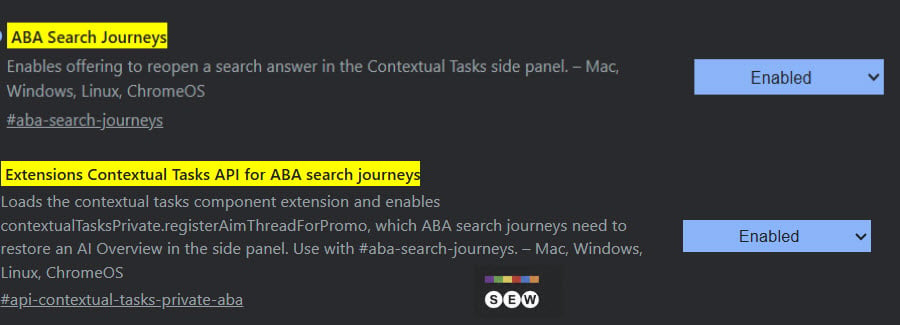
How this was written. Clicktag wrote this article with a language model from Search Engine Watch’s reporting (model: @cf/meta/llama-3.3-70b-instruct-fp8-fast); it describes that reporting rather than adding to it. The original, linked above, is the full story.
Key points from Search Engine Watch’s report
- Google is working on a feature to integrate Search AI Overviews into Chrome's side panel as part of the 'ABA Search Journeys' project.
- The feature aims to allow users to easily resume searches without re-entering their query by reopening the associated AI Overview in Chrome's side panel.
- The feature is still experimental, and Google has not announced a release date for ABA Search Journeys.
- The development involves complex interactions between different components of the Chrome browser, including a private Contextual Tasks API and cross-tab search detection.
- Google has implemented a word-count threshold for triggering a Search Journey to ensure that not all cross-tab searches qualify for this feature.
Google is experimenting with a new feature that could enhance user experience in Chrome, Search Engine Watch reported. The feature involves reopening AI Overviews from Google Search results pages in Chrome's side panel. This development is part of Chrome's experimental 'ABA Search Journeys' project.
The main goal of this feature is to allow users to easily resume a search without having to re-enter their query. By reopening the associated AI Overview directly in Chrome's side panel, users can save time and effort. This functionality may be particularly useful for users who need to switch between multiple tabs.
A newly discovered Chrome flag, 'Extensions Contextual Tasks API for ABA search journeys,' is a key component of this feature. This flag enables a private Contextual Tasks API used by ABA Search Journeys, which is available on various operating systems, including Mac, Windows, Linux, and ChromeOS.
The flag description provides insight into how the feature works, mentioning an API that lets Google Search register an AI Mode thread for restoration. According to Chromium's API documentation, Chrome uses supplied parameters to open the AI Overview as the first turn of an AI Mode conversation. This process involves complex interactions between different components of the Chrome browser.
The workflow of this feature involves multiple tabs and user interactions. When a user searches Google in one tab and then returns to a previous tab, Chrome may prompt them to open the relevant AI Overview in the side panel. This prompt is intended to help users quickly access relevant information without having to navigate back to the search results page.
Other related developments include cross-tab search detection and the ability to recognize when a search query matches text recently copied from another tab. Additionally, Google has implemented a word-count threshold for triggering a Search Journey, which means that not all cross-tab searches will qualify for this feature.
It is essential to note that both flags related to this feature remain experimental, and Google has not announced a release date for ABA Search Journeys. As a result, users may not see this feature in the near future, but it has the potential to significantly enhance their browsing experience.
Questions and answers
What is the purpose of the 'Extensions Contextual Tasks API for ABA search journeys' flag?
The flag enables a private Contextual Tasks API used by ABA Search Journeys, which is a key component of the feature to integrate Search AI Overviews into Chrome's side panel.
How does the workflow of this feature involve multiple tabs?
The workflow involves a user searching Google in one tab, then returning to a previous tab, where Chrome may prompt them to open the relevant AI Overview in the side panel.
Is the feature available to users now?
No, the feature is still experimental, and Google has not announced a release date for ABA Search Journeys.